


- 100 Mbps is a comfortable internet speed for the average remote worker living alone.
- Consider your household's collective internet needs, not just work-from-home tasks.
- Depending on your situation, your employer may cover internet expenses or, if you're self-employed, you can write off internet usage.
Working from home can be a dream — no commute, comfy clothes and your favorite coffee at your fingertips. But if your internet speed can’t keep up with your daily tasks, that dream quickly turns into a nightmare of frozen Zoom calls and files that take forever to upload. Let’s break down how much internet speed you need to work from home to crush your workday (without the headaches).
Table of Contents
The Speed You Need to Handle Your Tasks
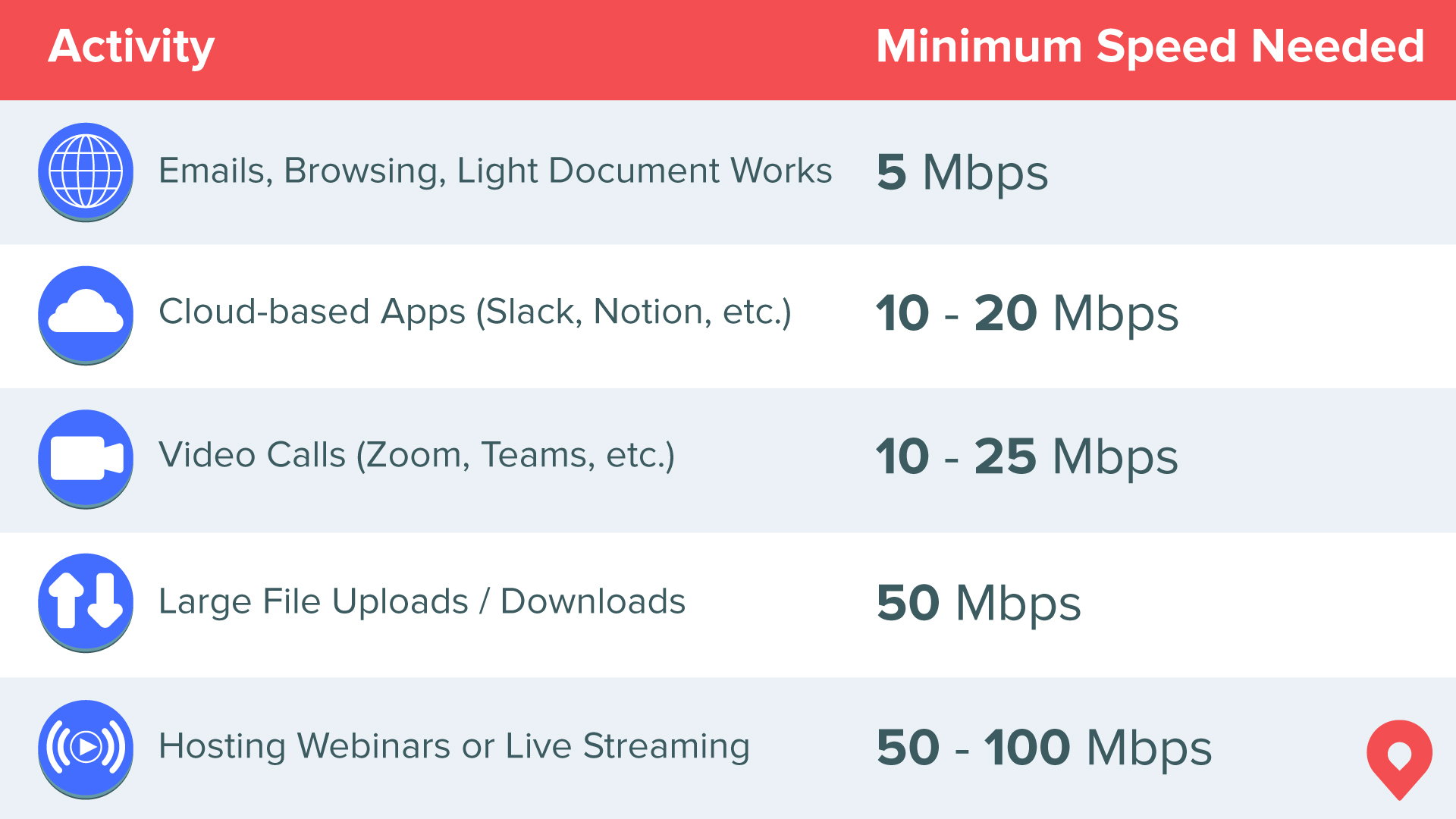
The internet speed you need depends a lot on the type of work you do. If you’re mostly sending emails or writing in Google Docs, you won’t need as much bandwidth as someone editing videos or hosting live webinars. But it’s not just about the work — the apps and tools you use can also impact your internet needs. For example, collaboration platforms like Slack or Microsoft Teams can eat up more bandwidth than you might think, especially if you’re constantly sharing files or screen sharing.
Here’s a quick cheat sheet to help you figure out what you need:
| Activity | Minimum download speed needed |
|---|---|
| Emails, browsing, and light document work | 5 Mbps |
| Cloud-based apps (Slack, Notion, etc.) | 10–20 Mbps |
| Video calls (Zoom, Teams, etc.) | 10–25 Mbps |
| Large file uploads/downloads | 50 Mbps |
| Hosting webinars or live streaming | 50–100 Mbps |
The more bandwidth-intensive your tasks are, the higher your speed requirements are. And don’t forget about multitasking — if you’re hopping between multiple apps, your connection needs to handle all that traffic smoothly.
| Download speeds vs. upload speeds: Download speed is how fast you get content from the internet (like streaming Netflix or loading a webpage), and it's what internet service providers (ISPs) advertise. Upload speed is how fast you send things to the internet (like sending files or streaming video) and doesn't generally have as large a range as download speeds. Good upload speeds hover around 20 Mbps. |
What's a Good Internet Speed for Working From Home?
For most remote workers living alone, 100 Mbps is a good internet speed and will cover most of your needs. It’s enough for video calls, emails, meetings and multi-tasking. The key is balancing speed with your actual workload and considering future needs. If your job evolves or your household grows, you'll want extra speed to stay ahead of the curve.
What Can I Do With 50 Mbps?
With 50 Mbps, you can comfortably handle video calls and use cloud apps. The FCC recently updated its broadband standard to 100 Mbps, so while 50 Mbps is decent, it might feel sluggish if you have multiple people online or work with large files. This speed is best for solo workers living alone with relatively light internet usage — think writers, marketers or anyone who doesn’t need to transfer huge files regularly.
What Can I Do With 100 Mbps?
100 Mbps is great for most remote work setups. You can video chat, download medium-sized files and even stream in HD without breaking a sweat. Plus, if you live with someone else working from home (with similar low-bandwidth needs), this speed helps avoid connection conflicts. It’s a sweet spot for most people, particularly couples without children or roommates. It's enough speed for demanding tasks without overpaying for more bandwidth than you actually use.
What Can I Do With 300 Mbps?
300 Mbps is perfect if you have a family engaging in heavy-bandwidth activities and want zero worries about internet speed. You can handle heavy-duty tasks like large file transfers or live streaming while others in your home do their own thing online — no lag, no stress. This speed is also great if you’re using smart home devices or gaming in your downtime, as it ensures everything stays connected and responsive.
Your Household's Internet Speed Needs

Your ideal internet speed isn’t just about your work. If your partner is also working from home, your kid is gaming or someone’s streaming movies all day, that eats up bandwidth. A household with multiple remote workers might need at least 300 Mbps to keep everything running smoothly.
Think of your internet like a highway — the more cars (devices) on the road, the more lanes (bandwidth) you need to avoid traffic jams. If you’re all online during peak hours, you might experience slowdowns unless you have enough speed to handle the collective demand.
It's smart to think about future-proofing your setup, too. As more devices connect to the internet, having extra bandwidth can keep your connection reliable without constant upgrades. Future-proofing your setup looks like increasing your internet speed to at least 500 Mbps, and even considering gigabit-speed plans. If available in your area, going with a fiber internet provider is optimal as this type of internet features symmetrical download and upload speeds, which is ideal for professionals working from home.
Why You Might Consider a VPN
Using a VPN (virtual private network) while working from home adds security by encrypting your internet connection, which is awesome for protecting sensitive data. But it can also slow down your speed since your traffic gets routed through an extra server. If you use a VPN, consider upgrading your internet plan so the added security doesn’t cost you speed.
VPNs are especially useful if you handle confidential client data or need to access company servers remotely. And some VPN services are faster than others, so choosing a high-performance provider can help you strike a balance between security and speed.
How to Choose an Internet Plan for Working From Home
When shopping for an internet plan, look for fast download and upload speeds, low latency and unlimited data. Some providers offer special packages for remote workers or small businesses, so it’s worth asking. Reliability is key — you don’t want your connection to drop in the middle of a meeting.
Consider bundle options, too. Some providers package Wi-Fi extenders or mesh systems with their plans, which can improve Wi-Fi speed and coverage if your home office is far from your router. And don’t be afraid to negotiate. Internet companies often have promotional rates or loyalty perks that can save you money.
Can I Get Business Internet at Home?
Many ISPs let you get business internet at home, which can come with perks like faster speeds, better customer service and priority support. It’s usually more expensive, but if your work relies heavily on a stable, speedy connection, it might be worth it. Business internet can also include static IP addresses, better security features and service level agreements (SLAs) that guarantee uptime—all of which can be game-changers if your job can’t afford interruptions.
Frequently Asked Questions About Internet Speed Working From Home
What is the best internet for remote work?
Fiber-optic internet connections are the gold standard. They offer fast, symmetrical download and upload speeds, which are perfect for video calls, large file transfers and cloud-based work. Cable internet is another solid option, offering high speeds at an affordable price. The key is choosing a plan with enough bandwidth for your work tasks and any other online activities happening in your home.
How to check Wi-Fi signal strength?
You can check your Wi-Fi signal strength right from your device. On a computer or phone, look at the Wi-Fi icon—the more bars, the stronger the signal. You can also test your internet speed by using third-party tools online to see if the speed you're getting is close to the speed on your internet plan.
Do Wi-Fi extenders work?
Wi-Fi extenders can help boost your Wi-Fi signal in hard-to-reach areas of your home. They work by grabbing your router’s signal and rebroadcasting it, extending coverage. They can cause a slight speed drop, but they’re a budget-friendly fix for dead zones. If you need more seamless coverage, a mesh Wi-Fi system might be a better option.
Who pays for internet when working from home?
The short answer: it depends. Some companies reimburse internet costs or offer a monthly stipend for remote workers. If your job requires high-speed internet, it’s worth asking your employer if they provide any assistance. Even if they don’t, you might be able to deduct a portion of your internet bill on your taxes if you’re self-employed or work as a freelancer.
Is satellite internet good for remote work?
Satellite internet can keep you connected in rural or remote areas with no other options, but it's less ideal for remote work due to higher latency, frequent data caps, and weather-related interruptions. Tasks like video meetings or large file transfers might be challenging, so consider satellite as a last resort if fiber, cable, or DSL aren't available in your area.